
Las Vegas, NV
Eastern/Silverado Ranch
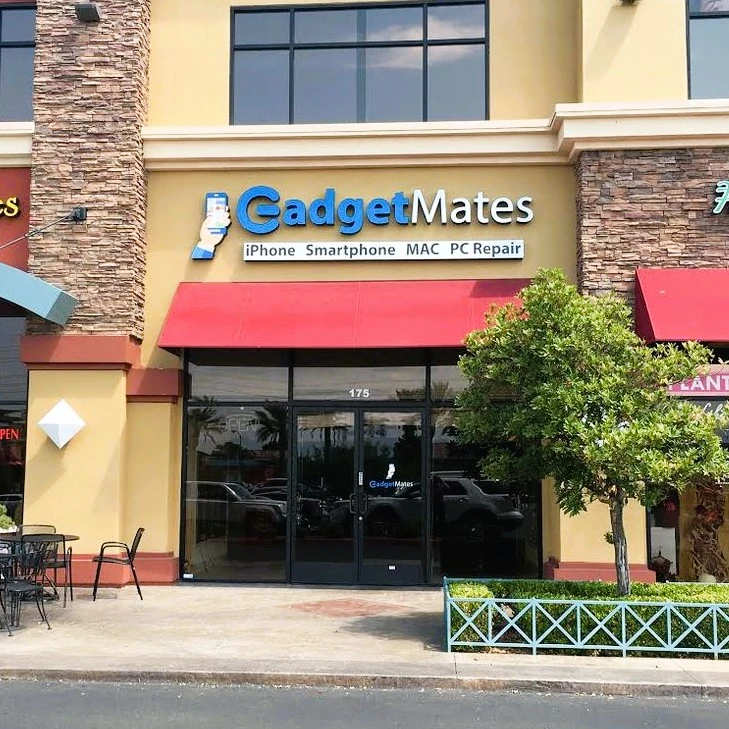
GadgetMates Las Vegas
Las Vegas, NV
(702) 444-0000
Address:
9480 S Eastern Ave #175 Las Vegas, NV 89123
Service Options In Las Vegas
- Cell Phone Repair
- Smartphone Repair
- iPhone Repair
- Back Glass Repair
- Samsung Galaxy Repair
- Google Pixel Repair
- Android Repairs
- Blackberry Repair
- Camera Replacement
- Water Damage Recovery
- Computer Repair
- Mac Repair
- Macbook Repair
- Desktop Repair
- Laptop Repair
- PC Screen Repair
- Microsoft Surface Repair
- Tune-Up Service
- Virus Removal
- Custom Builds
- Gaming Computer
- Water Cooling / Gaming Setups
- Hardware or Software Issues
- Tablet Repair
- iPad Repair
- Galaxy Tab Repair
- Cracked Screens, Battery Issues
- Camera Replacement
- Water Damage Recovery
- Gaming Console Repair
- Xbox Repair
- Playstation Repair
PS4 Repair | PS5 Repair - Nintendo Repair
- Free Diagnostic
- Hardware or Software Issues
This Store Serves the Following Regions:
Las Vegas, Silverado Ranch, Summerlin, West Charleston Boulevard, West Sahara Avenue, Anthem, St Rose, 215 & Eastern
Location Overview
Cell Phone, iPad, & Computer Repair Shop
Phone: (702) 444-0000
Hours: 10AM – 7PM (7 Days a Week)
215 Freeway / Eastern Exit (Silverado Ranch)
In the same shopping center as ‘The Source’, ‘BJs’, and ‘Twin Peaks’
Repair Services In The Las Vegas Store
About GadgetMates – Las Vegas
GadgetMates in Las Vegas, NV, offers top-notch, no-obligation diagnostic services for a range of devices, including iPhones, Samsung smartphones, computers, and iPads. Our expert technicians can repair all sorts of issues such as screen replacements, charging ports, battery problems, software glitches, and even internal hardware damages. With a fast turnaround, quality guarantee, and stellar customer support, we have a reputation for reliable and affordable service. Our repair services use only the highest quality parts for repairs and come with a 30-day warranty. We also specialize in computer repairs, including handling software problems, virus removal, data recovery, and system upgrades, for various brands like Dell, HP, Lenovo, Acer, and more. On top of that, we offer regular Mac maintenance services. At GadgetMates, your satisfaction is our top priority, and we provide cost-effective, transparent, and competitive pricing. Don’t let a faulty device disrupt your productivity – trust GadgetMates to bring your gadgets back to their optimal functionality.
Location
Our GadgetMates Las Vegas, NV location is conveniently located at 9480 S Eastern Ave #175, Las Vegas, NV 89123 off I-215 at Eastern Exit. To reach us from the the strip, take I-15 South to the I-215 East. Get off on Eastern Ave and keep right at the fork, follow signs for Eastern Ave South and merge onto S Eastern Ave, which you will take until you see Richmar Ave. Turn left on Richmar and drive to the back of the shopping center where you will see GadgetMates.
We are nestled between GriddleCakes and ‘The Source’ in the same shopping center as BJ’s, Einsteins, and Twin Peaks.
We have served the Las Vegas area for nearly a decade. Plus, because all our employees are trained on PC and Apple products, we’re your trustworthy resource for all things iPhone, iPad, and Mac. Get in touch by calling (702) 444-0000.
Products
GadgetMates Las Vegas has all the Apple products you need in one convenient location. We stock a wide selection of the latest Mac computers and MacBooks for all your computing needs. If you need something more portable, try out a versatile tablet like the iPad or pickup a new or used iPhone.
With its new features, the iPhone offers an all-screen design, super retina HD display and the smartest chip ever in a smartphone. We carry all the latest iPhones as well as the latest versions of the iPod and Apple Watch. If you’ve been craving an amazing TV experience, check out Apple TV, where you can get Apple TV+, Netflix, Disney+, HBO Max, and all your favorite streaming services on a single device.
With the help of our professional staff at GadgetMates Las Vegas, you’ll be sure to find the products you want.
Repairs
Bad accidents happen to good electronics. Our GadgetMates Las Vegas location offers all the repair services you need in one stop including iPhone screen repairs. Our trained technicians offer the best support for Apple and PC products to take care of any problem you’re having. Whether you have screen damage or water damage, we can help. Data backup issues, battery & power issues, and app issues are no match for our techs. Best of all, most repairs are done same or next day.
Trade-Ins
If you are ready for some new electronics, then trade in your old devices at our GadgetMates Las Vegas location and earn store credit towards new items. You can see how much your old Apple Mac is worth by visiting our store or calling before. Once you bring your trade-in to the store we will provide the final quote and give you store credit for anything sold at GadgetMates Las Vegas. It’s that simple. Our goal is to make it easy for you to switch and run the most up-to-date devices with minimal hassle. Let’s see what we can do for you today.
write to us
Have A Question?
Contact Us!
If you need to get in touch with us we offer several methods.
Email Us
info@gadgetmates.com
address
GadgetMates
9480 S Eastern Ave #175
Las Vegas, NV 89123
Call Us
+1 (702)-444-0000
Store Hours
10:00 am – 7:00 pm
Every Day
Our social media:
GadgetMates Locations
Silverado Ranch
9480 S Eastern Ave #175
Las Vegas, NV 89123
Click To See On Google
Phone: (702) 444-0000
Sunset Park/Airport
3095 E Patrick Ln Suite 3
Las Vegas, NV 89120
Click To See On Google
Phone: (702) 444-0000